
Car rental and rent-to-own software
Run your rental business from one screen
Bookings, check-out and check-in, bonds, rego and service dates, invoices and rent-to-own instalments. BookandManage puts the whole hire desk in one place, for every person on your team.
- No setup fee
- Unlimited users and cars
- Cancel any time

Everything in one place
Eight areas. One login for the whole team.
Home shows a tile for each area with a live number on it. Inside, each area opens on its own overview, and people only see what their role allows.
- BookingsPickups and returns, the booking calendar, availability and quotes.How it works
- LeadsEnquiries, online applications with document upload, and customers.How it works
- FleetCars and models, servicing, inspections, damage and compliance dates.How it works
- FinanceInvoices, payments, bonds, refunds, reminders and reports.How it works
- ContractsRent-to-own contracts, instalments and ownership transfers.How it works
- ChannelsSearch bars, car listings and enquiry forms for your website.How it works
- EmailsBranded templates for every customer email, and what was sent.How it works
- TeamPeople, roles and permissions, and tasks with due dates.How it works
- areas in one login
- 8
- customer emails, ready to send
- 25
- permissions for your own roles
- 15
- a month, everything included
- $149
Built for the rental desk
The jobs you do every day, done properly
Every picture here is the real product, with demo data for a made-up business.
Bookings
No more double-bookings
The calendar has a row for every car, with hires, rent-to-own contracts, workshop days and cars held for a lead. Availability only offers cars that are free for the whole hire, turnaround time included, and suggests a similar or better category when one is full.
- Week, 2-week and month views
- Hold a car for a lead for 72 hours
- Click an empty day to book that car

Check-out and check-in
Hand over the keys in one step
One dialog at the counter covers what's owing, the bond and how it was taken, odometer, fuel in eighths, the licence check and the customer's signature. At return, late fees, extra kilometres and refuelling are worked out from your own rates. Waive any line, then refund the bond, apply it, or hold it for the inspection.
- Late fees per hour after a grace period
- Fuel charged per eighth short
- Damage found holds the bond


Finance
Get paid on time
Every hire raises its own invoice. Payments, booking deposits and bonds are recorded against it, overdue amounts show on Home before anyone goes looking, and reminders go out on the schedule you set: before the due date, on the day and after it.
- Tax invoices and receipts as PDFs
- Refunds need an approver
- Reminders stop when a bill is paid

Fleet
Keep every car legal and on the road
Registration, insurance, inspection certificates and services are tracked for every car. Anything due in the next 30 days, or a service within 1,000 km, is flagged on the Fleet overview, along with any car that's booked out past its rego date.
- Condition reports with damage marks
- Charge damage, claim or book the repair
- Workshop days block the calendar

Rent-to-own
Rent-to-own next to your hires
Weekly, fortnightly or monthly instalments, deposits, late fees and arrears sit alongside your rentals, not in a second system. Every contract shows what's paid and what's left, and when the last instalment clears, the ownership transfer checklist takes over.
- Terms of 52 to 156 weeks
- Late fees after a grace period
- Settlement letter as a PDF

A morning at the desk
From the first coffee to the first pickup
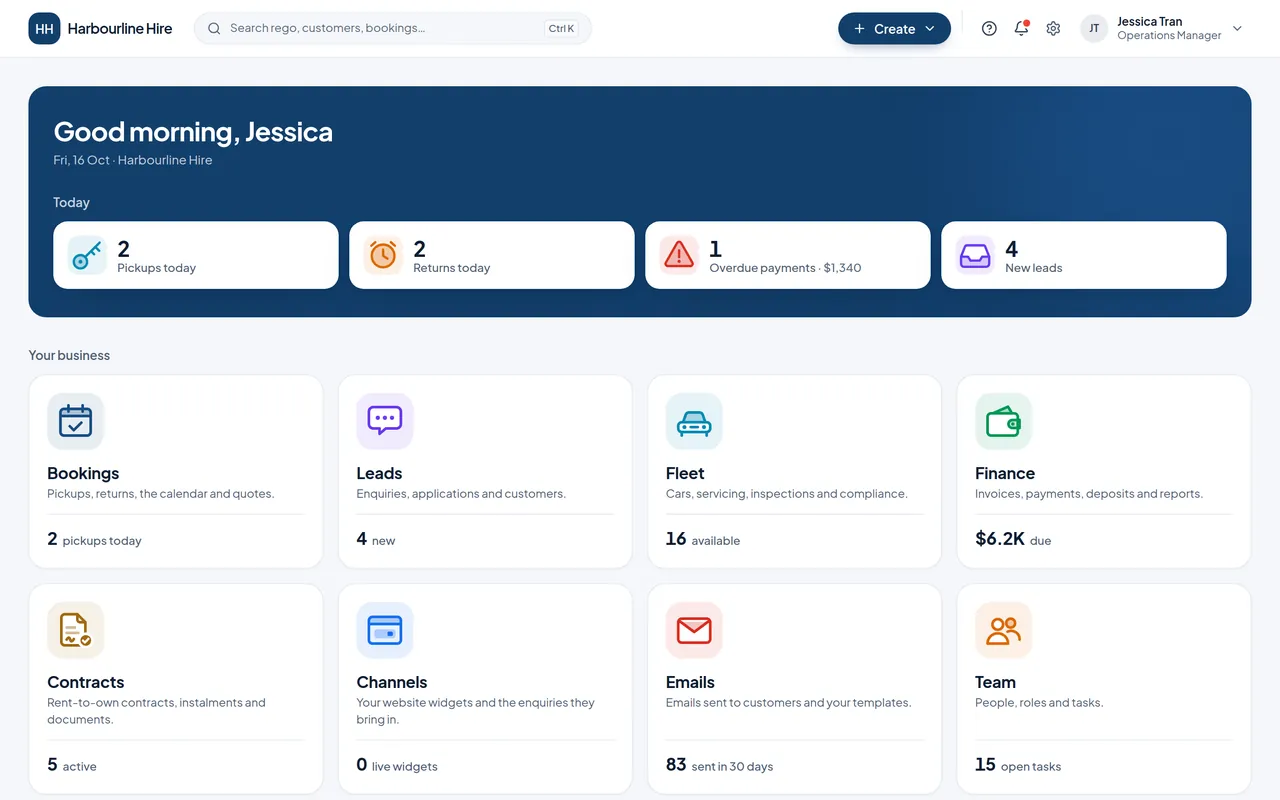
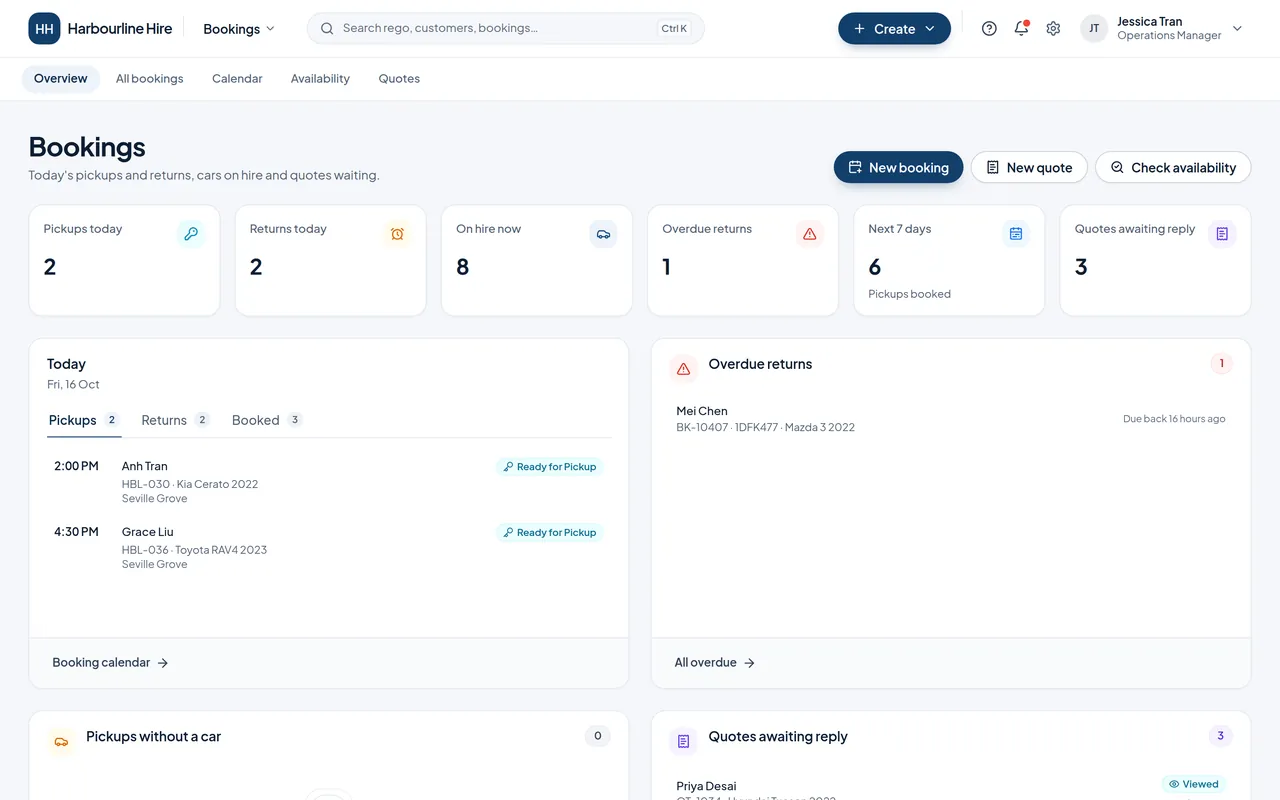
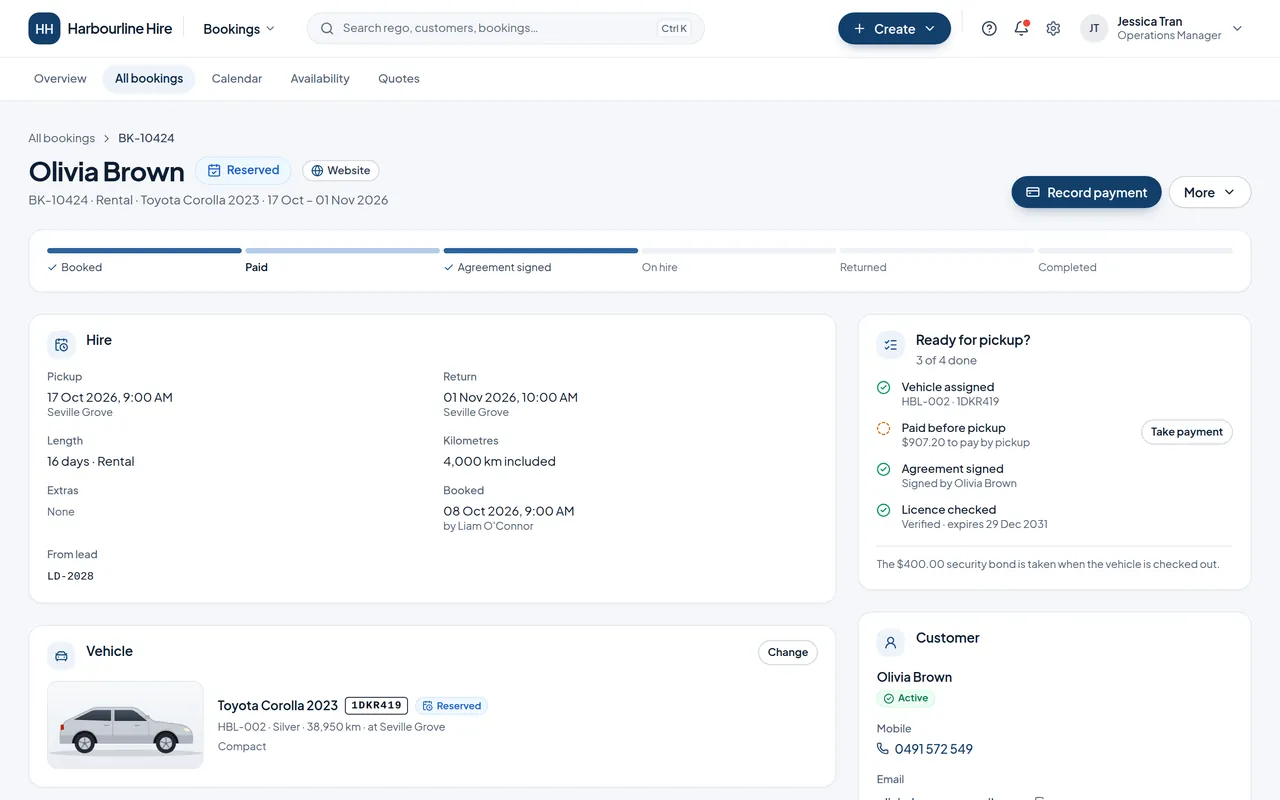
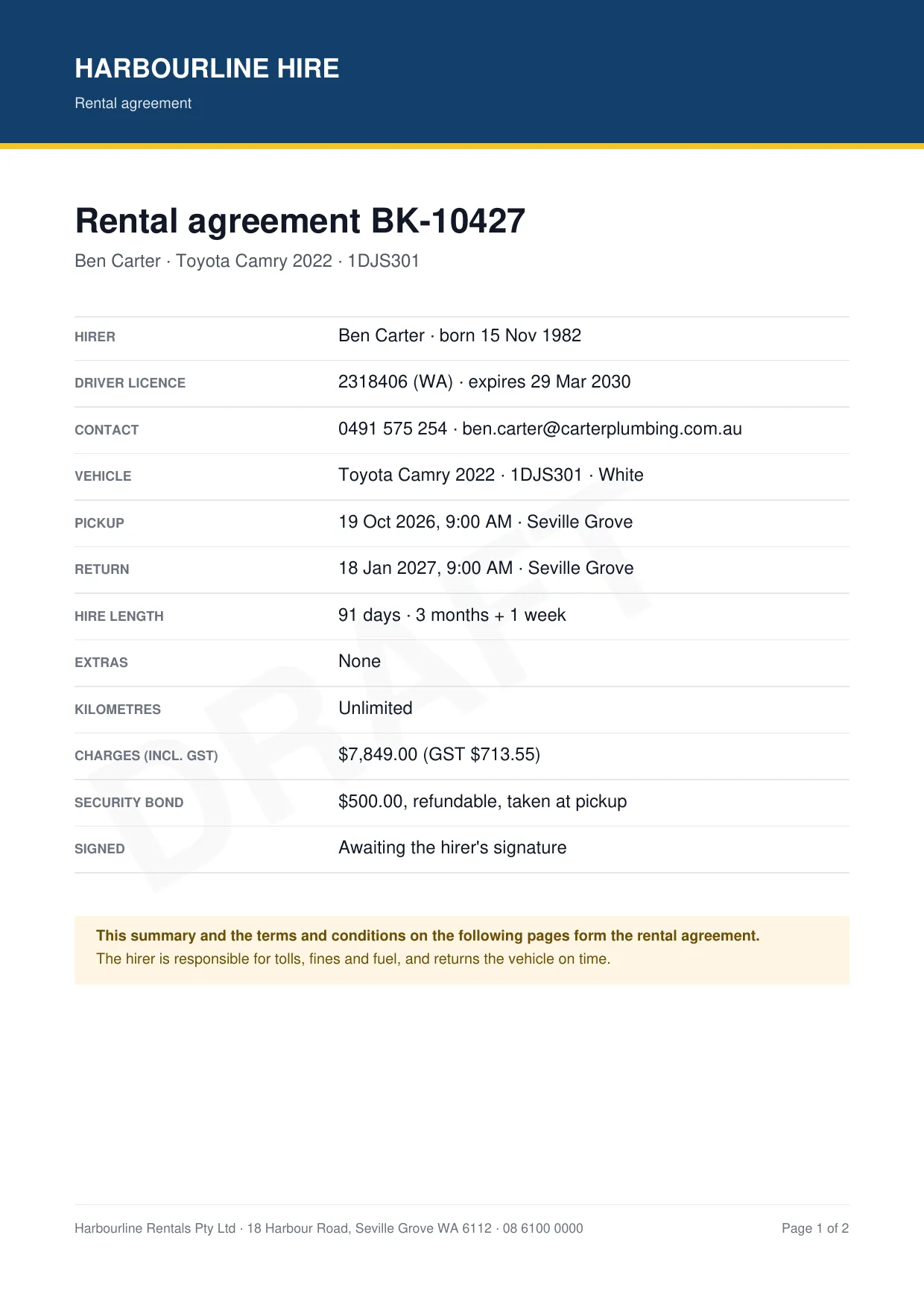
Home, the Bookings overview, a booking that's nearly ready, and the agreement the customer signs. Scroll through it.
1Home7:30 am
Two pickups, two returns, one overdue payment and four new leads. Each number opens the list behind it.
2The Bookings overview7:32 am
Today's pickups with their cars and times, last night's overdue return, and the quotes still waiting for a reply.
3One booking8:55 am
Booked, agreement signed, licence checked. The checklist shows what's left before pickup, and the main button is always the next step.
4The agreement9:00 am
Printed with your logo, the hire details and your own terms and conditions. Signed at the counter, or emailed as a PDF.


7:30 am
Home
Two pickups, two returns, one overdue payment and four new leads. Each number opens the list behind it.
7:32 am
The Bookings overview
Today's pickups with their cars and times, last night's overdue return, and the quotes still waiting for a reply.
8:55 am
One booking
Booked, agreement signed, licence checked. The checklist shows what's left before pickup, and the main button is always the next step.
9:00 am
The agreement
Printed with your logo, the hire details and your own terms and conditions. Signed at the counter, or emailed as a PDF.
And everything around it
The details that save you a phone call
Online applications
Customers apply on their phone and upload their licence, proof of address and payslips. You verify each check and approve.
Branded PDFs
Agreements with your own terms, condition reports, tax invoices, receipts and settlement letters, all with your logo.
25 customer emails
Confirmations, reminders, receipts and more, sent from your own address. Change the wording or switch any off.
Roles and permissions
Build roles from 15 permissions. Separate who approves a refund from who pays it out.
Audit log
Who changed what and when, with the before and after, for money, settings and the team.
Your currency and tax
GST, VAT or sales tax, your time zone, date format and bank details, set once for the whole business.
Delivery and collection
Hand cars over at the customer's address, with address search and your own delivery fee.
Seven reports
Revenue, utilisation, bookings, conversion, rent-to-own, money owed and maintenance costs, with CSV export.
Tasks and alerts
Assign tasks with due dates, and get alerts for new enquiries, payments, returns and expiring rego.
Channels
Take bookings on the website you already have
Design a widget in BookandManage, paste one line into your site, and enquiries arrive in Leads with the page they came from. It can match your website's colours and fonts in one click.
- Search barVisitors pick a branch and dates; matching cars open over your page.
- Car listingYour cars with daily, weekly and rent-to-own prices, ending in an enquiry or a booking request.
- Enquiry formYour own questions. Every enquiry becomes a lead for whoever you choose.

The whole installation
<script src="https://app.bookandmanage.com/embed.js" data-org="your-business" data-widget="WGT-78RV" async></script>Paperwork
Paperwork with your name on it
Agreements, condition reports, invoices and receipts come out as PDFs with your logo, colours and details, ready to print, email or attach.


- Rental agreementsHirer, licence, car, pickup and return, charges and bond, then your own terms and conditions. A draft watermark until it's signed.
- Condition reportsReadings, the six-point checklist, damage marked on the car diagram, photos and both signatures.
- Invoices and receiptsTax invoices with your bank details and a PAID, OVERDUE or VOID stamp. Receipts for every payment.
- Rent-to-ownThe contract with your rent-to-own terms, and the settlement letter once it's paid off.
- HistoryEvery rental of a car, every hire of a customer, or the full record of one booking, as a PDF or a spreadsheet.
How it works
From sign-up to your first booking
Nothing to install. It runs in the browser on the counter PC, a laptop or a phone in the car park.
- 1
Buy online
Business name, your name, email and country, then pay on the secure checkout. Open to businesses in any country.
- 2
Answer the setup wizard
Nine short steps: company, logo, region and tax, main location, rental rules, payments, email, team and rent-to-own.
- 3
Add cars and invite the team
Categories are ready. Add each model with daily, weekly and monthly rates, then your cars, and invite staff with the right role.
Pricing
One plan, with everything in it
BookandManage
$149USD / month
Per business. Tax added at checkout where it applies.
Everything included
- Unlimited staff, cars and bookings
- Rent-to-own included
- All eight areas
- Website widgets
- Branded PDFs and emails
- Roles, permissions and audit log
- No setup fee
- Cancel any time
Not right for you? Ask within 7 days of your first payment and we refund it, less USD 10.
Questions
Before you ask
Who is BookandManage for?
Businesses that hire out cars: independent car hire, rideshare and delivery-driver rentals, long-term hire and rent-to-own. The price is the same whether you run five cars or five hundred.
Is rent-to-own extra?
No. Rent-to-own contracts, payment plans, late fees and ownership transfers are part of the one plan, next to your ordinary hires.
Do I need a new website?
No. Widgets go on the website you already have with one line of code, and they can match its colours and fonts. Any website that lets you paste HTML will work, and every widget also has a hosted link you can share.
Can we try it first?
There's no free trial. Book a demo and we'll walk you through it with sample data. If you buy and it isn't right, you can ask for a refund within 7 days of your first payment.
What happens to our customers' data?
It's yours. We never sell it or share it, and we only use it to run the service. The account owner can download the business's data at any time.
Tomorrow's pickups, sorted today
Start now and the setup wizard walks you through the rest. Or book a call and we'll show you round with sample data first.